
a black and white icon of a calendar

January 15, 2026

a black and white clock icon in a circle

4 min read

Running Bioinformatics Pipelines in Production: A Strategic Guide for Decision-Makers

How to choose the right infrastructure for your Nextflow workflows based on business requirements, not just technical features.

The global bioinformatics market generated $8,614.29 million in 2019 and is projected to reach $24,731.61 million by 2027, growing at a CAGR of 13.4% from 2020 to 2027 (source).

Yet despite this growth, most organisations stumble on a far more basic problem. Not how to design algorithms. Not how to analyse data. But how to run their computational workflows reliably in production?

This gap between analysis and execution is where most bioinformatics efforts quietly struggle, and where real business impact is either created or lost.

Let us start by understanding why this deployment problem exists, especially in the era of cloud computing. The root of the issue often lies in how we define workflows and pipelines in bioinformatics.
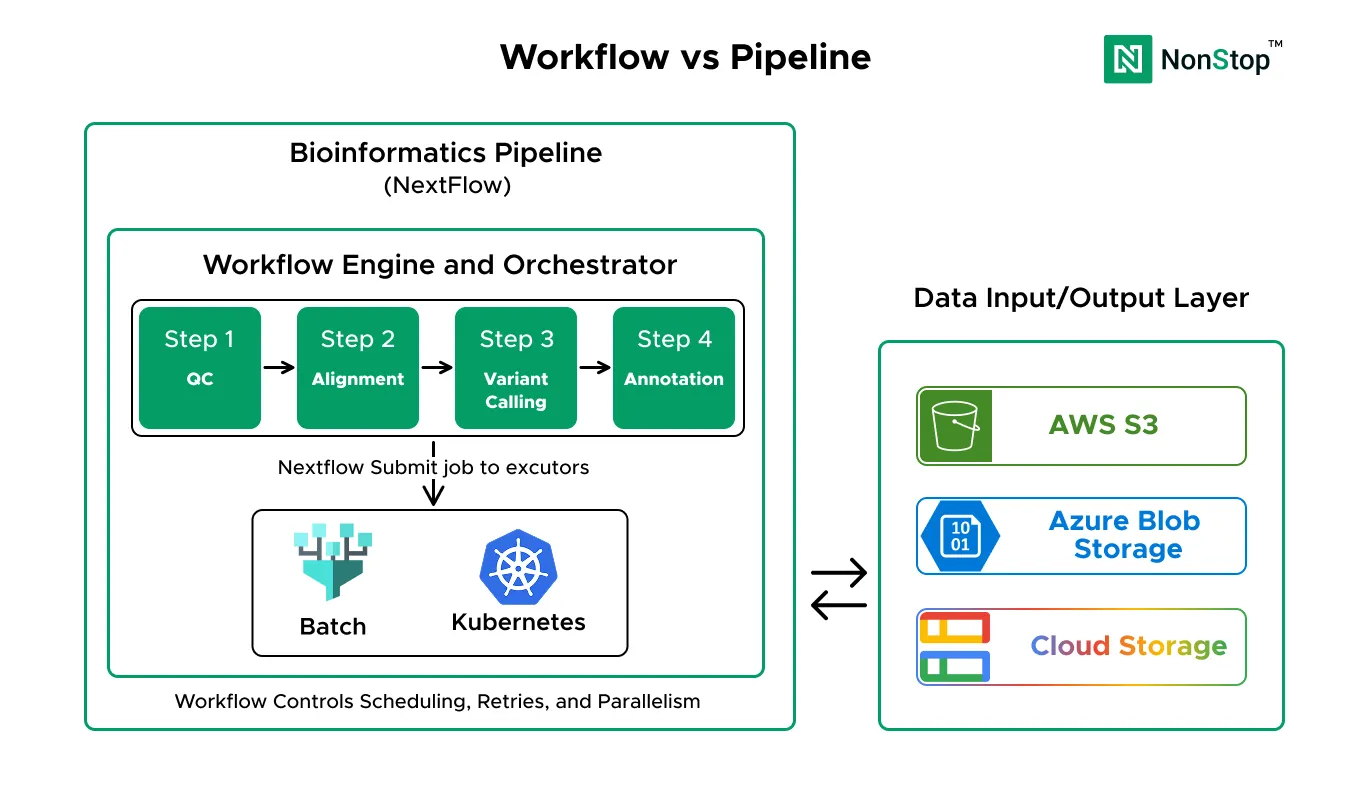
The Real Problem: Workflows vs Pipelines

Workflow Vs Pipeline

A workflow is the computational logic. It’s the executable definition of what runs, in what order, and how data flows between steps. This is what you write in Nextflow, WDL, Snakemake, or CWL. It bundles tools into processes, connects them with data channels, and defines the DAG for execution. A workflow answers one question clearly: what computation happens?

A pipeline is the full operational system that turns raw data into a usable result, reliably and repeatedly, under real-world constraints. It includes the workflow, but also everything around it: reference databases, storage architecture, compute infrastructure, security controls, access management, monitoring, cost controls, retries, audits, and operational ownership. A pipeline answers a different question: can we trust this to run in production?

The relationship is simple but critical. The workflow is a major component of the pipeline, but it is not the pipeline by itself.

Why This Decision Matters Now

Four converging trends are forcing bioinformatics teams to professionalize their infrastructure:

1. Explosive Data Growth
2. Regulatory Pressure
3. Competitive Advantage
4. Talent Gap

Understanding Your Requirements

Before choosing an approach, assess two key factors:

1. Scale

  • Small: Under 1,000 samples/month
  • Medium: 1,000–10,000 samples/month
  • Large: Over 10,000 samples/month

2. Team Capability

  • Basic: Bioinformaticians with minimal cloud experience
  • Intermediate: Some cloud knowledge
  • Advanced: DevOps team with Kubernetes expertise

These two factors determine which option fits best.

Three Approaches to Production Pipelines:

Option 1: AWS HealthOmics

*Logos are trademarks of their respective owners and are used here for informational purposes only

AWS HealthOmics is a purpose-built, fully managed service for genomics and multiomics workloads. It provides storage, analytics, and workflow execution specifically designed for healthcare and life sciences.

Perfect For:

  1. Clinical diagnostics labs
  2. Healthcare organizations handling patient data
  3. Pharma companies with FDA submission requirements
  4. Organizations prioritizing compliance over flexibility

Managed By: AWS (fully managed service)

Team Requirements:

  • Need someone who understands bioinformatics and basic AWS concepts
  • No DevOps expertise required
  • Can be run by the bioinformatics team directly

How Fast Can You Launch:

  • Setup: Quick (mostly account configuration)
  • First production run: Very fast
  • Ongoing management: Minimal (few hours per week)

The Big Promise:

HealthOmics removes infrastructure complexity entirely. You focus on workflows, AWS handles everything else: compute provisioning, scaling, security, compliance controls, and monitoring.

The Money Talk:

  • Most expensive per sample (premium for managed service)
  • Lowest operational cost (minimal staff time required)
  • Fastest time to value (no infrastructure setup delays)

At small to medium scale (under 5,000 samples/month), the total cost is competitive because you save on personnel. At a very large scale, per-sample costs become the dominant factor.

The Good Stuff:

  • Compliance Built-In: HIPAA-ready architecture, audit logging, encryption by default
  • Zero Infrastructure Management: AWS handles everything
  • Healthcare-Specific Optimizations: Purpose-built for genomics
  • Fastest Time to Production: Days, not weeks
  • Predictable Costs: Clear pricing, no surprise bills
  • Integrated Analytics: Built-in variant analysis and annotation tools

Critical HIPAA Compliance Note:

While AWS HealthOmics is designed for healthcare workloads, using cloud storage for PHI (Protected Health Information) requires specific HIPAA compliance measures

The Tradeoffs:

  • Vendor Lock-In: Tightly coupled to the AWS HealthOmics ecosystem
  • Limited Flexibility: Cannot customize the infrastructure deeply
  • Higher Per-Sample Cost at Scale: Premium pricing for managed service
  • Regional Availability: Not available in all AWS regions yet
  • Newer Service: Smaller community, fewer third-party integrations

Strategic Considerations:

  • Migrating away requires workflow rewrites
  • Cost per sample decreases at high volume but remains higher than self-managed options
  • Faster time to market can justify premium pricing

Read the AWS HealthOmics implementation guide


Option 2: Batch Services with Nextflow

Batch Architecture

Batch computing services (AWS Batch, Azure Batch, Google Cloud Batch) are managed services that run batch jobs at any scale. Combined with Nextflow, they enable production-grade workflow execution without requiring infrastructure management.

Perfect For:

  1. Research labs and academic institutions
  2. Biotech startups with limited IT resources
  3. Organizations prioritizing simplicity and cost efficiency
  4. Teams are comfortable with bioinformatics, but have minimal DevOps experience

Managed By: Partially managed (cloud provider handles compute scaling, you manage workflow orchestration)

Team Requirements:

  • Need someone who understands bioinformatics and understands cloud
  • Cloud knowledge is required
  • No dedicated DevOps team required

How Fast Can You Launch:

  • Setup: Quick
  • First production run: Fast
  • Ongoing management: Moderate (several hours per week)

The Big Promise:

Batch services provide the simplest path to production-grade pipelines. No server management, automatic scaling, pay only for compute time used. You get reliability without complexity.

The Money Talk:

  • Lowest infrastructure cost (especially with spot instances)
  • Moderate operational cost (some cloud management required)
  • Best cost efficiency at small to medium scale

Using spot instances reduces compute costs by up to 90%. At medium scale (100–5,000 samples/month), this is typically the most cost-effective option overall.

The Good Stuff:

  • Lowest Entry Cost: Minimal upfront investment
  • Simple Architecture: Fewer moving parts than Kubernetes
  • No Server Management: Cloud provider handles provisioning
  • Spot Instance Support: Up to 90% savings on compute
  • Quick Setup: Production-ready in days
  • Flexible Scaling: Handles 10 samples or 100,000 automatically
  • Low Operational Overhead: Minimal ongoing maintenance

Important for Clinical/PHI Data:

If handling Protected Health Information, batch services require manual HIPAA compliance configuration

The Tradeoffs:

  • Limited Customization: Cannot deeply tune infrastructure
  • Spot Instance Interruptions: Occasional job restarts (mitigated by Nextflow resume)
  • Smaller Community: Less ecosystem than Kubernetes
  • Cloud-Specific: Skills are less transferable between AWS Batch, Azure Batch, and GCP Batch
  • HIPAA Compliance Manual: No built-in compliance controls

Strategic Considerations:

  • Small to medium teams with limited cloud expertise
  • Cost-sensitive organizations
  • Standard Nextflow workflows without deep customization needs
  • Want to start simple and scale gradually

Read the AWS Batch implementation guide


Option 3: Nextflow on Kubernetes

Kubernetes Architecture

Kubernetes is a container orchestration platform that provides maximum control over infrastructure. Running Nextflow on Kubernetes (Amazon EKS, Azure AKS, Google GKE) provides the flexibility to customise every aspect.

Perfect For:

  1. Enterprise organizations with DevOps teams
  2. Companies running multiple complex workflows
  3. Teams requiring deep infrastructure customization
  4. Organizations with existing Kubernetes expertise

Managed By: Partially managed (cloud provider manages Kubernetes control plane, you manage most other aspects)

Team Requirements:

  • Need dedicated DevOps engineers with Kubernetes expertise
  • People who understand Kubernetes, cloud networking, and security
  • Not suitable for teams without Kubernetes experience

How Fast Can You Launch:

  • Setup: Longer (cluster setup, networking, RBAC, monitoring)
  • First production run: Significant time investment
  • Ongoing management: Substantial (requires dedicated attention)

The Big Promise:

Kubernetes provides maximum flexibility and control. If you have complex requirements, need advanced features, or already have Kubernetes expertise, this gives you the power to build exactly what you need.

The Money Talk:

  • Infrastructure costs are competitive with Batch (at large scale, potentially lower)
  • Highest operational cost (requires a dedicated DevOps team)
  • Highest fixed costs (team required regardless of volume)

The infrastructure is cost-efficient, but you need personnel to manage it. At small to medium scale, the team cost outweighs infrastructure savings. At very large scale (10,000+ samples/month), infrastructure optimization makes this cost-competitive overall.

The Good Stuff:

  • Maximum Flexibility: Complete control over infrastructure
  • Multi-Cloud Portability: Kubernetes skills work across EKS, AKS, GKE
  • Advanced Features: Custom networking, service mesh, complex orchestration
  • Huge Ecosystem: Extensive community, mature tooling
  • Enterprise Features: Sophisticated RBAC, audit logging, compliance controls
  • Multiple Workflows: Easily run many pipelines concurrently
  • Deep Optimization Possible: Can tune for maximum efficiency at scale

HIPAA Compliance:

Kubernetes provides the most control over compliance but also the most responsibility.

The Tradeoffs:

  • High Operational Cost: Requires a dedicated DevOps team
  • Complex Setup: Weeks to production instead of days
  • Steep Learning Curve: Team needs Kubernetes expertise
  • Ongoing Maintenance: Security patches, version upgrades, monitoring
  • Over-Engineering Risk: Often overkill for simpler use cases
  • Higher Fixed Costs: Team required regardless of processing volume
  • Troubleshooting Complexity: More layers to debug when issues occur
  • HIPAA Compliance Complexity: Complete manual configuration required

Strategic Considerations:

  • Enterprise organizations with existing DevOps/SRE teams
  • Already running Kubernetes for other services
  • Multiple complex workflows with interdependencies
  • Teams are already experts in Kubernetes
  • Regulatory requirements needing deep infrastructure control
  • Very large scale, where infrastructure optimization becomes critical

Read the Amazon EKS implementation guide


Comparison

Decision Framework

Choose based on your situation:

HealthOmics → Clinical diagnostics, need HIPAA compliance, limited IT team.
Batch Services → Research labs, cost-sensitive, small to medium scale.
Kubernetes → Enterprise with a DevOps team needs advanced customization, large scale.

Conclusion

The bioinformatics infrastructure market is growing at 13% annually, reaching $18.7 billion by 2027. Organizations that choose infrastructure wisely gain a competitive advantage through faster results, lower costs, and better reliability. Those who choose poorly waste money on over-engineered solutions or face scaling problems later.