

Run production-grade Nextflow pipelines using AWS Batch with minimal setup. No complexity. No orchestration headaches. Just working on pipelines.
Before we dive into the “why AWS Batch” question, let’s talk about what Nextflow actually is.
Nextflow is a workflow orchestration engine designed for data-intensive computational pipelines. Think of it as a sophisticated task manager that can:
Originally built for genomics (where a single analysis might have 20+ steps and run for days), Nextflow is now popular in data science, ML pipelines, and any field dealing with complex data processing.
The key feature? Nextflow utilises containers (such as Docker) for each task, ensuring your analysis is reproducible; it’ll run the same way on a laptop as it does on a cloud cluster.
Why AWS Batch for Nextflow?
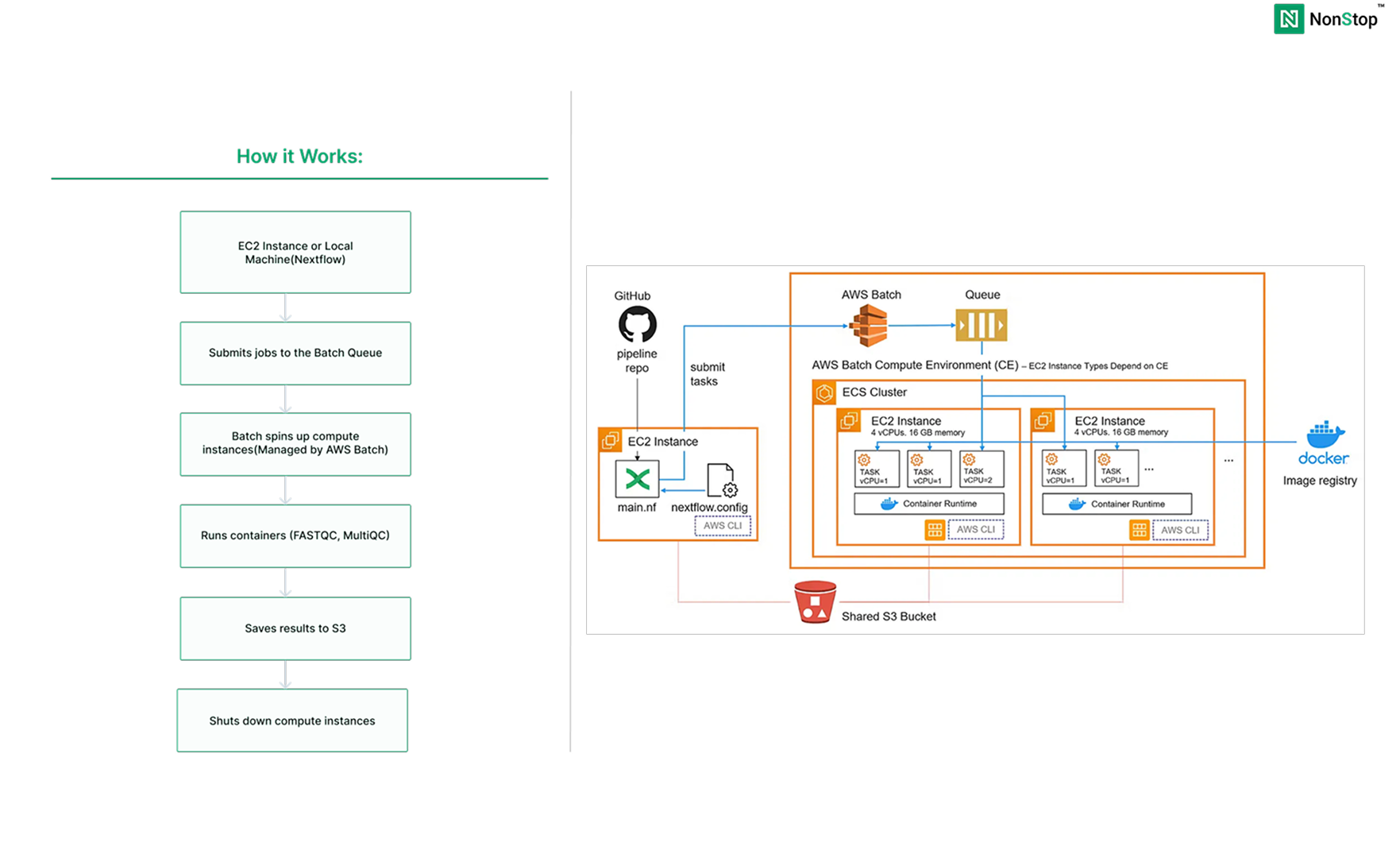
AWS Batch is a managed service that runs batch computing workloads. You define what to compute, AWS handles everything else: provisioning servers, queuing jobs, scaling up and down, and cleanup.
Here’s why it pairs perfectly with Nextflow:
Compare this to running your own compute cluster or managing complex infrastructure. AWS Batch removes all that operational burden.
Step 1: Create S3 Bucket
1. Open S3 Console:
2. Configure:
1. Open S3 Console:
nextflow-demo-yourname (must be globally unique)
3. Create Folders:
Inside the bucket:
inputs → Createresultswork
4. Upload Data:
inputs/ folder
Step 2: Create IAM Roles
We need two roles: one for the EC2 instance, one for the Batch compute environment.
Role 1: EC2 Instance Role
1.Open IAM Console
2. Select Trusted Entity:
3. Attach Policies
Add these three policies:
AmazonS3FullAccessAWSBatchFullAccessAmazonECS_FullAccessAmazonECS_FullAccessNote: To restrict this to the exact bucket, you can create a custom policy and attach it instead of the AmazonS3FullAccess policy.
Click Next
4. Name and Create:
NextflowEC2Role
Step 3: Create AWS Batch Compute Environment
1. Open Batch Console:
2. Orchestration Type:
3. Name:
nextflow-compute
4. Service Role:
5. Instance Configuration:
BatchComputeInstanceRole
6. Capacity
PS: You can modify this as per your requirements
7. Network:
8. Create
Step 4: Create Job Queue
1. Navigate
2. Configure
nextflow-queuenextflow-compute
3. Create
Step 5: Launch EC2 Instance
1. Open EC2 Console:
2. Basic Configuration:
nextflow-launcher
3. Network Settings:
4. Advanced Details:
NextflowEC2Role
5. Launch:
NextflowEC2Role
Step 6: Install Nextflow
1. Connect to the Instance
If required, the pipeline can also be run from a local system after installing and configuring the AWS CLI. However, we’ve set up a dedicated EC2 instance for this purpose, and we’ll be using that going forward.
2. Connect to the Instance
1. Connect to the Instance
2. Install Nextflow
sudo dnf install java -y
curl -s https://get.nextflow.io | bash
sudo mv nextflow /usr/local/bin/
sudo chmod +x /usr/local/bin/nextflow
nextflow -version
What we’re doing:
Think of it this way: FASTQC is your detailed inspector, checking each piece individually, and MultiQC is the manager who summarises everything into a single executive report.
main.nf - This is your pipeline definition
#!/usr/bin/env nextflow
nextflow.enable.dsl=2
params {
reads = 's3://your-bucket-name/inputs/sample_data.fastq'
outdir = 's3://your-bucket-name/results'
}
process FASTQC {
container 'biocontainers/fastqc:v0.11.9_cv8'
publishDir "${params.outdir}/fastqc", mode: 'copy'
input:
path reads
output:
tuple path("*.html"), path("*_fastqc.zip")
script:
"""
echo "Running FASTQC on ${reads}"
fastqc ${reads}
echo "FASTQC completed for ${reads}"
"""
}
process MULTIQC {
container 'multiqc/multiqc:dev'
publishDir "${params.outdir}/multiqc", mode: 'copy'
input:
path fastqc_reports
output:
path "multiqc_report.html"
path "multiqc_data"
script:
"""
echo "Aggregating FASTQC reports with MultiQC"
multiqc .
echo "MultiQC report generated successfully"
"""
}
workflow {
reads_ch = Channel.fromPath(params.reads)
fastqc_reports_ch = FASTQC(reads_ch)
MULTIQC(fastqc_reports_ch.collect())
}
nextflow.config - This tell Nextflow how to run on batch :
plugins {
    id 'nf-wave'
    id 'nf-amazon'
}

wave {
    enabled = true
}

fusion {
    enabled = true

}

process {
    executor = 'awsbatch'
    queue    = '<job-queue-name>'

    cpus   = 1
    memory = '2 GB'

    // Error strategy: retry on transient AWS Batch issues
    errorStrategy = { task.exitStatus in [130, 137, 143, 151] ? 'retry' : 'finish' }
    maxRetries = 3

    withName: FASTQC {
        container = 'biocontainers/fastqc:v0.11.9_cv8'
    }

    withName: MULTIQC {
        container = 'multiqc/multiqc:v1.14'
    }
}

aws {
    region = 'us-east-1'
    batch {
        volumes = '/fusion'
    }
}

workDir = 's3://<your-bucket-name>/work'Important: Replace <yourbucket-name> and <job-queue-name>with your actual name in both files.Push this to your GitHub repo.
Run the Pipeline
nextflow run https://github.com/username/repo-name.git
Outlook will look like:
N E X T F L O W  ~  version 24.04.4
Pulling username/repo-name ...
downloaded from https://github.com/username/repo-name.git
Downloading plugin nf-wave@1.16.1
Downloading plugin nf-amazon@3.4.2
Downloading plugin nf-tower@1.17.3
Launching `https://github.com/username/repo-name` [awesome_lichterman] DSL2 - revision: e4b5f72abf [main]
executor >  awsbatch (2)
[a1/b2c3] process > FASTQC   [100%] 1 of 1 ✔
[e5/f6g7] process > MULTIQC  [100%] 1 of 1 ✔
Completed at: 08-Jan-2025 10:30:15
Duration    : 3m 45s
CPU hours   : 0.4
Succeeded   : 2
What happens:
You’ve just built a production-ready Nextflow pipeline on AWS Batch. With minimal setup (S3, two IAM roles, Batch environment, and one EC2 instance), you now have a system that:
The beauty of this setup is its simplicity. No complex networking. No multiple services to maintain. Just Nextflow coordinating jobs and AWS Batch handling the compute.
AWS Batch removes the operational burden. You don’t patch servers, manage clusters, or worry about capacity planning. Submit your pipeline, and AWS takes care of the rest.
Nextflow handles the complexity of your workflow. Dependencies, retries, parallelization, and resume capability are all built in. Your job is defining what to analyze, not how to manage the infrastructure.
This same setup scales from analyzing a single sample to processing thousands. The pipeline we built today (FASTQC + MultiQC) can easily extend to variant calling, RNA-seq analysis, or any multi-step computational workflow.
Teams using this approach report:
Happy Hosting!


